
Exchange 2010 Administrator Audit log Powershell GUI

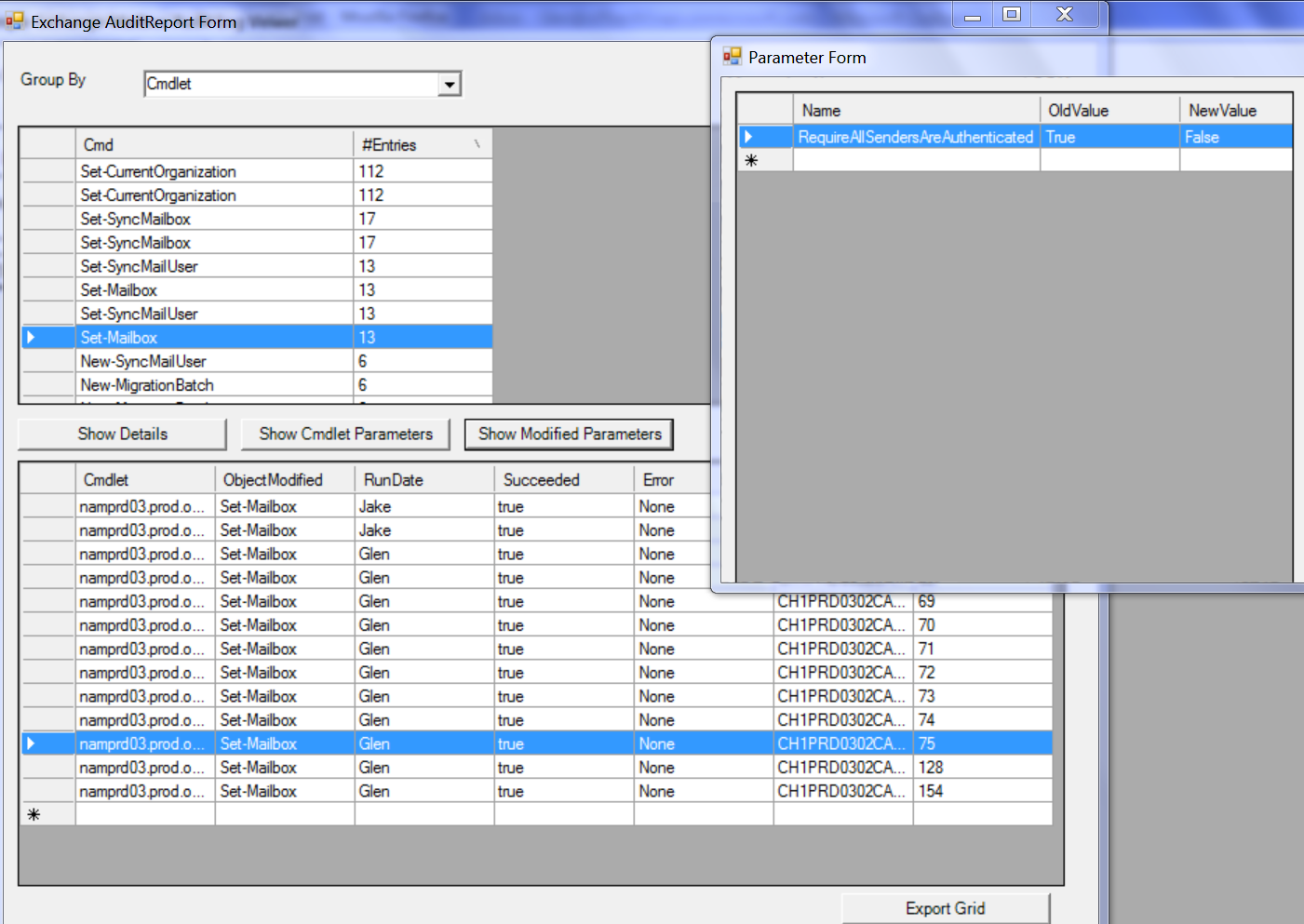
An interesting and useful new feature of Exchange 2010 is Administrator audit logging where each time a EMS cmdlet is run in the Exchange in the EMS, EMC or ECP this is logged. Within ECP you can do a search of the admin Audit logs and have the result emailed to you and what you receive in your inbox is an email with an a attachment called searchresult.xml. While this file contains a lot of great information there are a few problems with this format for administrators firstly is that OWA and Oultook will usually block the XML attachments so it can firstly be hard to get to the attachment. Secondly XML isn't the most readable format when it comes to trying to intemperate what was going on especially if you search across a larger number of days. So what I've put together is a GUI that first uses the EWS Managed API to find these any of these emails within your inbox and then gives you the option of exporting the raw xml or converting the XML to a CSV file or lastly using a separate report winform that groups the data retrieved and displays it back to the user. The later i think is a lot more useful as it lets you work more intuitively with the data and the better you can do this the more likely it is that you would spot an abnormality which is one to the purposes of auditing. eg this is what it looks like


Note this GUI currently only handles the Admin Audit logs not the Mailbox Audit log which are in a different format.

I've put a download of this script here
Popular posts from this blog

The MailboxConcurrency limit and using Batching in the Microsoft Graph API

If your getting an error such as Application is over its MailboxConcurrency limit while using the Microsoft Graph API this post may help you understand why. Background   The Mailbox  concurrency limit when your using the Graph API is 4 as per https://docs.microsoft.com/en-us/graph/throttling#outlook-service-limits . This is evaluated for each app ID and mailbox combination so this means you can have different apps running under the same credentials and the poor behavior of one won't cause the other to be throttled. If you compared that to EWS you could have up to 27 concurrent connections but they are shared across all apps on a first come first served basis. Batching Batching in the Graph API is a way of combining multiple requests into a single HTTP request. Batching in the Exchange Mail API's EWS and MAPI has been around for a long time and its common, for email Apps to process large numbers of smaller items for a variety of reasons.  Batching in the Gr...

Sending a MimeMessage via the Microsoft Graph using the Graph SDK, MimeKit and MSAL

One of the new features added to the Microsoft Graph recently was the ability to create and send Mime Messages (you have been able to get Message as Mime for a while). This is useful in a number of different scenarios especially when trying to create a Message with inline Images which has historically been hard to do with both the Graph and EWS (if you don't use MIME). It also opens up using SMIME for encryption and a more easy migration path for sending using SMTP in some apps. MimeKit is a great open source library for parsing and creating MIME messages so it offers a really easy solution for tackling this issue. The current documentation on Send message via MIME lacks any real sample so I've put together a quick console app that use MSAL, MIME kit and the Graph SDK to send a Message via MIME. As the current Graph SDK also doesn't support sending via MIME either there is a workaround for this in the future my guess is this will be supported.

Export calendar Items to a CSV file using Microsoft Graph and Powershell

For the last couple of years the most constantly popular post by number of views on this blog has been  Export calendar Items to a CSV file using EWS and Powershell closely followed by the contact exports scripts. It goes to show this is just a perennial issue that exists around Mail servers, I think the first VBS script I wrote to do this type of thing was late 90's against Exchange 5.5 using cdo 1.2. Now it's 2020 and if your running Office365 you should really be using the Microsoft Graph API to do this. So what I've done is create a PowerShell Module (and I made it a one file script for those that are more comfortable with that format) that's a port of the EWS script above that is so popular. This script uses the ADAL library for Modern Authentication (which if you grab the library from the PowerShell gallery will come down with the module). Most EWS properties map one to one with the Graph and the Graph actually provides better information on recurrences then...
All sample scripts and source code is provided by for illustrative purposes only. All examples are untested in different environments and therefore, I cannot guarantee or imply reliability, serviceability, or function of these programs.

All code contained herein is provided to you "AS IS" without any warranties of any kind. The implied warranties of non-infringement, merchantability and fitness for a particular purpose are expressly disclaimed.