Folder Associated Items are hidden Items in Exchange Mailbox folders that are commonly used to hold configuration settings for various Mailbox Clients and services that use Mailboxes. Some common examples of FAI's are Categories,OWA Signatures and WorkHours there is some more detailed documentation in the https://msdn.microsoft.com/en-us/library/cc463899(v=exchg.80).aspx protocol document. In EWS these configuration items can be accessed via the UserConfiguration operation https://msdn.microsoft.com/en-us/library/office/dd899439(v=exchg.150).aspx which will give you access to either the RoamingDictionary, XMLStream or BinaryStream data properties that holds the configuration depending on what type of FAI data is being stored.
I've written a number of scripts over the years that target particular FAI's (eg this one that reads the workhours http://gsexdev.blogspot.com.au/2015/11/finding-timezone-being-used-in-mailbox.html is a good example ) but I didn't have a generic script that could allow you to browse and read the data from any FAI in a Mailbox which would be useful when you are trying to peer into FAI's when debugging or reporting on different clients and services that use these FAI's.
So what I've done for this post in publish a really basic Powershell Module to the PowerShell Gallery https://www.powershellgallery.com/packages/EWS-FAI that can do this. The script requires that you have the EWS Managed API installed and then it has two Cmdlets. The source for the module can be found on GitHub here https://github.com/gscales/Powershell-Scripts/tree/master/EWS-FAI/Module
Invoke-ListFAIItems
The cmdlet will browse and display a list of any configuration FAI Items in a Folder eg to show the Items in the Non_IPM_SubTree use
it will produce an output such as

Other folders such as the Inbox and Calendar contain some of the more useful FAI's eg

A quick rundown on these
AvailiablityOptions is a newie
Calendar Contains the calendar processing information more of intrest when looking at a room mailbox
CategoryList Is the Master Cateogry List of a Mailbox (XML)
WorkHours Is the workhours setting for a Mailbox (XML)
Get-FAIItem
If you see an FAI that you want to view the contents of for example the OWA.UserOptions this the cmdlet you can use to do this

Because this FAI is a Roaming Directory this is what is returned to the pipeline.
If you have an FAI the contains XML like the Category list the cmdlet will return XML back to you which you may or may not be able to work with depending on your skill level in PowerShell. But if you just want to look at the Content in plain text at the cmdlet line you can do the following

I've written a number of scripts over the years that target particular FAI's (eg this one that reads the workhours http://gsexdev.blogspot.com.au/2015/11/finding-timezone-being-used-in-mailbox.html is a good example ) but I didn't have a generic script that could allow you to browse and read the data from any FAI in a Mailbox which would be useful when you are trying to peer into FAI's when debugging or reporting on different clients and services that use these FAI's.
So what I've done for this post in publish a really basic Powershell Module to the PowerShell Gallery https://www.powershellgallery.com/packages/EWS-FAI that can do this. The script requires that you have the EWS Managed API installed and then it has two Cmdlets. The source for the module can be found on GitHub here https://github.com/gscales/Powershell-Scripts/tree/master/EWS-FAI/Module
Invoke-ListFAIItems
The cmdlet will browse and display a list of any configuration FAI Items in a Folder eg to show the Items in the Non_IPM_SubTree use
Invoke-ListFAIItems -MailboxName mailbox@domain.com -Folder Root
it will produce an output such as
Other folders such as the Inbox and Calendar contain some of the more useful FAI's eg
A quick rundown on these
AvailiablityOptions is a newie
Calendar Contains the calendar processing information more of intrest when looking at a room mailbox
CategoryList Is the Master Cateogry List of a Mailbox (XML)
WorkHours Is the workhours setting for a Mailbox (XML)
Get-FAIItem
If you see an FAI that you want to view the contents of for example the OWA.UserOptions this the cmdlet you can use to do this
egGet-FAIItem -MailboxName mailbox@domain.com -Folder Root -ConfigItemName OWA.UserOptions
Because this FAI is a Roaming Directory this is what is returned to the pipeline.
If you have an FAI the contains XML like the Category list the cmdlet will return XML back to you which you may or may not be able to work with depending on your skill level in PowerShell. But if you just want to look at the Content in plain text at the cmdlet line you can do the following
Get-FAIItem -MailboxName mailbox@domain.com -Folder Calendar -ConfigItemName CategoryList | Select-Object InnerXML | FL
The other optional parameter for this cmdlet is the -ReturnConfigObject switch which will return the actual UserConfiguration Typed object from the EWS Managed API which is useful if you want to update the FAI in question or your dealing with the BinaryStream which this module doesn't handle. Eg you can use the following script to turn off the FocusedInbox in OWA for a user
$OwaOptions = Get-FAIItem -MailboxName user@domain.com -Folder Root -ConfigItemName OWA.UserOptions -ReturnConfigObjectif($OwaOptions.Dictionary.ContainsKey("IsFocusedInboxEnabled")){ $OwaOptions.Dictionary["IsFocusedInboxEnabled"] = $false $OwaOptions.Update() }
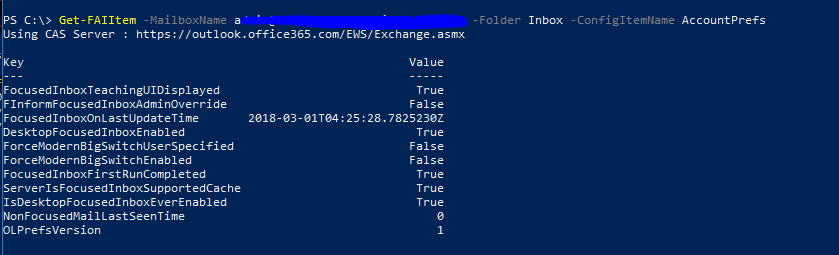
Get-FAIItem -MailboxName mailbox@domain.com -Folder Inbox -ConfigItemName AccountPrefs