Following on from my previous post on using MailTips and one of my other popular posts the FreeBusy board the following script creates an Out of office board that shows in one page peoples out of office status and if the out of office message is turned on it displays the OOF message for that user.Here's a quick picture of what it produces
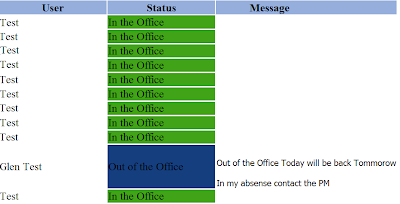
So how does it work it takes advantage of MailTips within EWS to get the OOF status of a user and what the OOF message is if its set. If you have a large number of users it batches the MailTips request in batches of 100 to ensure the request is successful. To get the list of users to query it takes advantage of using Remote powershell and uses the Get-Mailbox cmdlet.
The following script is setup to work with Office365 but will work OnPremise as well if change around the remote powershell URL.
The following variables are those that need to be configured to run this script
$UserName = "user@domain.com"
$Password = "password"
This is the username and password to use for both the remote powershell connection and it will also be used in the EWS Connection.
$MailboxName = $UserName
This line is setting the Sender email Address for MailTips to the above username if your using UPN's that are different from your SMTP addresses then you will need to change this variable.
$rpRemotePowershell = New-PSSession -ConfigurationName Microsoft.Exchange -ConnectionUri https://ps.outlook.com/powershell -credential $adminCredential -Authentication Basic -AllowRedirection
If your using this in a OnPrem environment then you need to change the URL and auth to suit your environment currently this is setup to connect to Office365.
I've put a download of this script here the script itself looks like

So how does it work it takes advantage of MailTips within EWS to get the OOF status of a user and what the OOF message is if its set. If you have a large number of users it batches the MailTips request in batches of 100 to ensure the request is successful. To get the list of users to query it takes advantage of using Remote powershell and uses the Get-Mailbox cmdlet.
The following script is setup to work with Office365 but will work OnPremise as well if change around the remote powershell URL.
The following variables are those that need to be configured to run this script
$UserName = "user@domain.com"
$Password = "password"
This is the username and password to use for both the remote powershell connection and it will also be used in the EWS Connection.
$MailboxName = $UserName
This line is setting the Sender email Address for MailTips to the above username if your using UPN's that are different from your SMTP addresses then you will need to change this variable.
$rpRemotePowershell = New-PSSession -ConfigurationName Microsoft.Exchange -ConnectionUri https://ps.outlook.com/powershell -credential $adminCredential -Authentication Basic -AllowRedirection
If your using this in a OnPrem environment then you need to change the URL and auth to suit your environment currently this is setup to connect to Office365.
I've put a download of this script here the script itself looks like
- $UserName = "user@domain.com"
- $Password = "pasdfawrd."
- $mbHash = @{ }
- $MailboxName = $UserName
- $batchSize = 100
- $global:oaBoard = ""
- $Mailboxes = @()
- $cred = New-Object System.Net.NetworkCredential($UserName,$Password)
- $secpassword = ConvertTo-SecureString $Password -AsPlainText -Force
- $adminCredential = New-Object -TypeName System.Management.Automation.PSCredential -argumentlist $UserName,$secpassword
- If(Get-PSSession | where-object {$_.ConfigurationName -eq "Microsoft.Exchange"}){
- write-host "Session Exists"
- }
- else{
- $rpRemotePowershell = New-PSSession -ConfigurationName Microsoft.Exchange -ConnectionUri https://ps.outlook.com/powershell -credential $adminCredential -Authentication Basic -AllowRedirection
- $importresults = Import-PSSession $rpRemotePowershell
- }
- get-mailbox -ResultSize unlimited | where-object {$_.HiddenFromAddressListsEnabled -eq $false} | foreach-object{
- if ($mbHash.ContainsKey($_.WindowsEmailAddress.ToString()) -eq $false){
- $mbHash.Add($_.WindowsEmailAddress.ToString(),$_.DisplayName)
- }
- $emailAddress = $_.WindowsEmailAddress.ToString()
- $Mailboxes += $emailAddress
- }
- $dllpath = "C:\Program Files\Microsoft\Exchange\Web Services\1.1\Microsoft.Exchange.WebServices.dll"
- [void][Reflection.Assembly]::LoadFile($dllpath)
- $service = New-Object Microsoft.Exchange.WebServices.Data.ExchangeService([Microsoft.Exchange.WebServices.Data.ExchangeVersion]::Exchange2010_SP1)
- $service.TraceEnabled = $false
- $service.Credentials = $cred
- $service.autodiscoverurl($MailboxName,{$true})
- function GetMailTips{
- $mbMailboxFolderURI = New-Object System.Uri($service.url)
- $wrWebRequest = [System.Net.WebRequest]::Create($mbMailboxFolderURI)
- $wrWebRequest.CookieContainer = New-Object System.Net.CookieContainer
- $wrWebRequest.KeepAlive = $false;
- $wrWebRequest.Headers.Set("Pragma", "no-cache");
- $wrWebRequest.Headers.Set("Translate", "f");
- $wrWebRequest.Headers.Set("Depth", "0");
- $wrWebRequest.ContentType = "text/xml";
- $wrWebRequest.ContentLength = $expRequest.Length;
- $wrWebRequest.Timeout = 60000;
- $wrWebRequest.Method = "POST";
- $wrWebRequest.Credentials = $cred
- $bqByteQuery = [System.Text.Encoding]::ASCII.GetBytes($expRequest);
- $wrWebRequest.ContentLength = $bqByteQuery.Length;
- $rsRequestStream = $wrWebRequest.GetRequestStream();
- $rsRequestStream.Write($bqByteQuery, 0, $bqByteQuery.Length);
- $rsRequestStream.Close();
- $wrWebResponse = $wrWebRequest.GetResponse();
- $rsResponseStream = $wrWebResponse.GetResponseStream()
- $sr = new-object System.IO.StreamReader($rsResponseStream);
- $rdResponseDocument = New-Object System.Xml.XmlDocument
- $rdResponseDocument.LoadXml($sr.ReadToEnd());
- $RecipientNodes = @($rdResponseDocument.getElementsByTagName("t:RecipientAddress"))
- $Datanodes = @($rdResponseDocument.getElementsByTagName("t:OutOfOffice"))
- for($ic=0;$ic -lt $RecipientNodes.length;$ic++){
- if($Datanodes[$ic].ReplyBody.Message -eq ""){
- $global:oaBoard = $global:oaBoard + "<tr>" + "`r`n"
- $global:oaBoard = $global:oaBoard + "<td>" + $mbHash[$RecipientNodes[$ic].EmailAddress] + "</td>" + "`r`n"
- $global:oaBoard = $global:oaBoard + "<td bgcolor=`"#41A317`">In the Office</td>" + "`r`n"
- $global:oaBoard = $global:oaBoard + "<td></td>" + "`r`n"
- $global:oaBoard = $global:oaBoard + "</tr>" + "`r`n"
- }
- else{
- $global:oaBoard = $global:oaBoard + "<tr>" + "`r`n"
- $global:oaBoard = $global:oaBoard + "<td>" + $mbHash[$RecipientNodes[$ic].EmailAddress] + "</td>" + "`r`n"
- $global:oaBoard = $global:oaBoard + "<td bgcolor=`"#153E7E`">Out of the Office</td>" + "`r`n"
- $global:oaBoard = $global:oaBoard + "<td>" + $Datanodes[$ic].ReplyBody.Message + "</td>" + "`r`n"
- $global:oaBoard = $global:oaBoard + "</tr>" + "`r`n"
- }
- }
- }
- $expHeader = @"
- <?xml version="1.0" encoding="utf-8"?>
- <soap:Envelope xmlns:soap="http://schemas.xmlsoap.org/soap/envelope/" xmlns:xsi="http://www.w3.org/2001/XMLSchema-instance" xmlns:xsd="http://www.w3.org/2001/XMLSchema">
- <soap:Header><RequestServerVersion Version="Exchange2010_SP1" xmlns="http://schemas.microsoft.com/exchange/services/2006/types" />
- </soap:Header>
- <soap:Body>
- <GetMailTips xmlns="http://schemas.microsoft.com/exchange/services/2006/messages">
- <SendingAs>
- <EmailAddress xmlns="http://schemas.microsoft.com/exchange/services/2006/types">$MailboxName</EmailAddress>
- </SendingAs>
- <Recipients>
- "@
- $global:oaBoard = $global:oaBoard + "<table><tr bgcolor=`"#95aedc`">" +"`r`n"
- $global:oaBoard = $global:oaBoard + "<td align=`"center`" style=`"width=200;`" ><b>User</b></td>" +"`r`n"
- $global:oaBoard = $global:oaBoard + "<td align=`"center`" style=`"width=200;`" ><b>Status</b></td>" +"`r`n"
- $global:oaBoard = $global:oaBoard + "<td align=`"center`" style=`"width=200;`" ><b>Message</b></td>" +"`r`n"
- $global:oaBoard = $global:oaBoard + "</tr>" + "`r`n"
- $expRequest = $expHeader
- $bCount =0
- foreach($mbMailbox in $Mailboxes){
- $bCount++
- $expRequest = $expRequest + "<Mailbox xmlns=`"http://schemas.microsoft.com/exchange/services/2006/types`"><EmailAddress>$mbMailbox</EmailAddress></Mailbox>"
- if($bCount -eq $batchSize){
- $expRequest = $expRequest + "</Recipients><MailTipsRequested>OutOfOfficeMessage</MailTipsRequested></GetMailTips></soap:Body></soap:Envelope>"
- GetMailTips
- $expRequest = $expHeader
- $bCount = 0
- }
- }
- if($bCount -ne 0){
- $expRequest = $expRequest + "</Recipients><MailTipsRequested>OutOfOfficeMessage</MailTipsRequested></GetMailTips></soap:Body></soap:Envelope>"
- GetMailTips
- }
- $global:oaBoard = $global:oaBoard + "</table>" + " "
- $global:oaBoard | out-file "c:\oofboard.htm"